 Batch Import
Overview
The Batch Import endpoint allows you to manage your Manual Imports by creating new Manual Imports, or by requesting information about or updating existing Manual Imports. Through this endpoint, you can send Base64-encoded data that you need to load into, or update, your database. When the request message is received, the inbound data is added to the import file queue, and will be processed based on the priority indicated within the API request.
The endpoint requires authentication using OAuth 2.0, and supports JSON and XML. The Batch Import endpoint requires the use of a Data Map, which provides data handling instructions.
Endpoint (North America): https://api.eccmp.com/services2/api/Import
Endpoint (Europe): https://api.ccmp.eu/services2/api/Import
Endpoint (Japan): https://api.marketingsuite.jp/services2/api/Import
For more details on the Batch Import API, please see the Batch Import API Technical Guide.
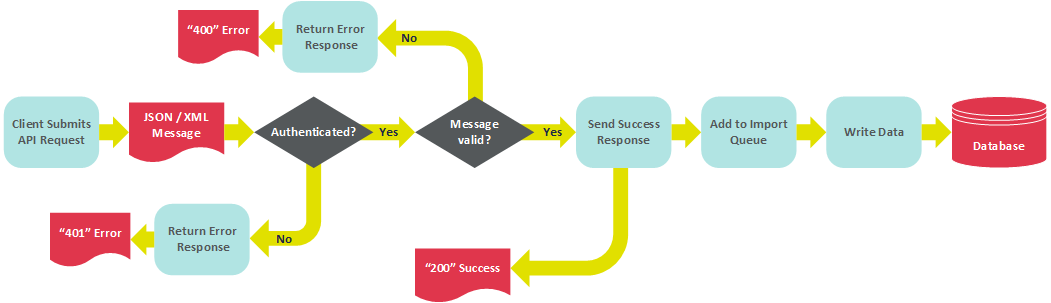
The following diagram depicts the processing flow for loading data via the Batch Import endpoint.
Pre-requisites
The Batch Import endpoint requires the following:
Data Map -- The Data Map provides data handling instructions, such as where to store the inbound data contained within the API request message, and whether this data should be used to update existing records and / or create new records.
The Batch Import endpoint supports the following optional assets:
Hierarchy Rule -- Hierarchy Rules are typically utilized by clients who use a Parent / Child database architecture. Hierarchy Rules are a top-down configuration feature set in the Parent system that determine which records a Child system can access.
NCOA Process -- NCOA Processes are typically utilized by clients running Print Campaigns. National Change Of Address (NCOA) is a process that submits a list of postal addresses to a service which maintains updated addresses for individuals who have filed a Change of Address with the U.S. Post Office.
GET Method
The Batch Import endpoint supports the following GET operation. This operation is intended to retrieve information about an existing Manual Import.
Retrieve a Manual Import
This endpoint allows you to retrieve information about a specified Manual Import by providing its Object Reference ID. The response message provides details of the Manual Import, and shows the results of the import process, such as number of records parsed, cleansed, etc. (see Data Parsing for more details on the platform's data parsing process).
Click hereClick here to see a sample response message in JSON format.
{
"import_id": 5506,
"import_name": "Recipient import",
"cust_id": 123,
"prop_map_id": 4296,
"type_id": "FILE",
"status_id": "DONE",
"import_file": "2017-07-26_18-51-35_9435930.txt",
"hierarchy_id": 100,
"task_priority": 700,
"importPreviewFlags": {
"import_id": 5506,
"skip_loaded_preview": 1,
"skip_parsed_preview": 0,
"skip_stats_preview": 1
},
"importStat": {
"import_id": 5506,
"parsing_start_time": "2017-07-26T22:51:48.713",
"parsing_finish_time": "2017-07-26T22:51:49.263",
"update_start_time": "2017-07-26T22:53:37.477",
"update_finish_time": "2017-07-26T22:53:39.817",
"importStatMetrics": [
{
"metric_val": 106,
"import_id": 5506,
"type_id": 1000
},
{
"metric_val": 126,
"import_id": 5506,
"type_id": "FILE_ROWS"
},
{
"metric_val": 0,
"import_id": 5506,
"type_id": "EMPTY_ROWS"
},
{
"metric_val": 106,
"import_id": 5506,
"type_id": "WARNINGS"
},
{
"metric_val": 0,
"import_id": 5506,
"type_id": "BAD_EMAILS"
},
{
"metric_val": 0,
"import_id": 5506,
"type_id": "FIXED_EMAILS"
},
{
"metric_val": 0,
"import_id": 5506,
"type_id": "BAD_PHONES"
},
{
"metric_val": 0,
"import_id": 5506,
"type_id": "FIXED_PHONES"
},
{
"metric_val": 0,
"import_id": 5506,
"type_id": "ERRORS"
},
{
"metric_val": 0,
"import_id": 5506,
"type_id": "BAD_AK_IDS"
},
{
"metric_val": 0,
"import_id": 5506,
"type_id": "CONFLICT_AK_IDS"
},
{
"metric_val": 0,
"import_id": 5506,
"type_id": "DUP_AK_IDS"
},
{
"metric_val": 0,
"import_id": 5506,
"type_id": "SWITCH_AK_IDS"
},
{
"metric_val": 6,
"import_id": 5506,
"type_id": "OLD_AK_IDS"
},
{
"metric_val": 120,
"import_id": 5506,
"type_id": "NEW_PK_IDS"
},
{
"metric_val": 0,
"import_id": 5506,
"type_id": "DUP_PK_IDS"
},
{
"metric_val": 126,
"import_id": 5506,
"type_id": "UPD_PK_IDS"
}
]
},
"obj": {
"obj_id": 46035,
"display_name": "Recipient import",
"type_id": "Import",
"ref_id": 5506,
"parent_obj_id": 39760,
"eligibility_status_id": "READY"
}
}
POST Method
The Batch Import endpoint supports the following POST operation. This operation allows you to submit records to load into, or to update, your database.
Create a Manual Import
This endpoint allows you to create a new Manual Import by providing the following information:
Your Customer ID.
The Object Reference ID of a Data Map.
Type ID: For a Manual Import, this value will be "FILE."
The character encoding method.
Optionally, the Object Reference ID of a Hierarchy Rule, and / or an NCOA Process.
The import file, sent as a single Base64-encoded text string.
Optionally, an import priority (if not provided, the system defaults to "Normal" priority).
The name of the new Manual Import.
The Folder ID of the folder where you want to save the new Manual Import.
Click hereClick here to see a sample request message in JSON format.
{
"cust_id": "394",
"prop_map_id": "4593",
"type_id": "FILE",
"import_file": "api_test_import",
"encoding": "UTF8",
"file": " RW1haWwsRmlyc3ROYW1lLExhc3ROYW1lDQpqb2huLmRvZUBjaGVldGFoZGlnaXRhbC5jb20sSm9obixEb2UNCm1hcn kuc21pdGhAY2hlZXRhaGRpZ2l0YWwuY29tLE1hcnksU21pdGgNCmhvbWVyLnNpbXBzb25AY2hlZXRhaGRpZ2l0YWwuY29tLEhvbWVy LFNpbXBzb24NCg=="
"Obj": {
"display_name": "Batch Import API Test",
"parent_obj_id": 37249
}
}
PUT Method
The Batch Import endpoint supports the following PUT operation. This operation is intended to update an existing Manual Import.
Update a Manual Import
This endpoint allows you to submit modifications to an existing Manual Import. The request message must include the Manual Import's Object Reference ID, and the desired changes.
Click hereClick here to see a sample request message in JSON format.
{
"import_id": 5204,
"import_name": "Recipient import",
"cust_id": 123,
"prop_map_id": 2925,
"type_id": "FILE",
"status_id": 180,
"import_file": "2017-05-09_10-43-49_2287177.csv",
"hierarchy_id": 100,
"task_priority": 700,
"importPreviewFlags": {
"import_id": 5204,
"skip_loaded_preview": 1,
"skip_parsed_preview": 0,
"skip_stats_preview": 1
},
"importStat": {
"import_id": 5204
},
"obj": {
"obj_id": 43594,
"display_name": "Recipient import updated",
"type_id": "Import",
"ref_id": 5204,
"parent_obj_id": 37249,
"eligibility_status_id": "READY"
}
}
Click hereClick here to see a sample response message in JSON format.
{
"import_id": 5204,
"import_name": "Recipient import updated",
"cust_id": 123,
"prop_map_id": 2925,
"type_id": "FILE",
"status_id": 180,
"import_file": "2017-05-09_10-43-49_2287177.csv",
"hierarchy_id": 100,
"task_priority": 700,
"importPreviewFlags": {
"import_id": 5204,
"skip_loaded_preview": 1,
"skip_parsed_preview": 0,
"skip_stats_preview": 1
},
"importStat": {
"import_id": 5204
},
"obj": {
"obj_id": 43594,
"display_name": "Recipient import updated",
"type_id": "Import",
"ref_id": 5204,
"parent_obj_id": 37249,
"eligibility_status_id": "READY"
}
}
DELETE Method
The Batch Import endpoint supports a DELETE operation that will delete the specified Manual Import. You must provide the Object Reference ID for the desired Manual Import.
Note: Deleted Manual Imports are moved to the Recycle Bin.
Back to API Category - Data Management